
CONNECTION DIAGNOSTICS
Steam is running. You’re signed in. And yet the server slams the door with a Steam rejection you didn’t cause on purpose. Here’s exactly what’s happening under the hood — and the ordered playbook to get back in the saddle.
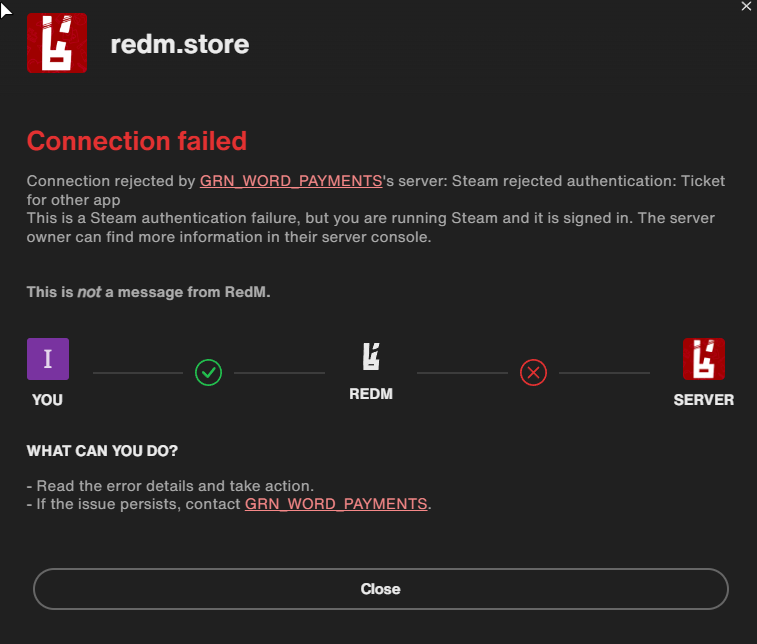
01What the message actually means
Every time you connect, RedM asks the Steam client for an authentication session ticket, cryptographically bound to a single Steam AppID — a number identifying one specific app. The server hands your ticket to Steam’s Web API to verify. If the AppID isn’t the one the server expects, verification fails — the exact wording you saw.
02Why the wrong AppID gets used
Steam only holds an authenticated “app context” for so many things at once. When RedM requests a ticket, Steam sometimes issues it against whatever app currently owns your session. The usual culprits:
- Another game is running (or stuck) in Steam — Steam mints the ticket for that AppID.
- RedM/FiveM launched before Steam was fully ready — the RedM AppID was never bound to your session.
- A crashed game left a ghost process — Steam still thinks it's the active app.
- Steam Client Beta — beta builds repeatedly ship broken ticket generation.
- Family Sharing / a second account muddying which library context is active.
- A stale Steam auth / download cache handing back an old ticket.
03The fix playbook — run in order
Do these top to bottom and stop as soon as you’re in. The first two resolve the large majority of cases.
Fully quit Steam — not just the windowfixes most cases
Closing the window only minimizes to tray. Right-click the Steam tray icon → Exit. Wait a few seconds, reopen, and let it sign in completely.
Confirm no other game is "Running"
In your library, nothing should show a green Running/Stop state. A crashed game may still hold the app context — reboot if you cannot clear it.
Launch order: Steam first, then RedM
Close RedM. Start Steam, wait until fully loaded and online, then launch RedM. Starting RedM first is the most common self-inflicted cause.
Leave the Steam Client Beta
Steam → Settings → Interface → Client Beta Participation → No beta chosen, then restart Steam.
Clear Steam download / auth cache
Steam → Settings → Downloads → Clear Download Cache. Steam restarts and asks you to sign in — that forces fresh tickets.
Verify or reinstall RedM/FiveM
A corrupted install can mis-register its AppID. Update the client; if it persists, do a clean reinstall (server data is untouched).
Last resort: connect with Steam closed
If the server does NOT require Steam, exit Steam and launch RedM — it falls back to Rockstar/CFX identifiers. If the server enforces Steam, only the owner can fix it.
04Advanced diagnosis
If you own the server or have console access, don’t guess — read the logs.
Client (F8 console): press F8 in RedM while connecting and look for Steam/authentication lines around the drop — it confirms whether the ticket was even generated locally.
Server console: the dialog literally says the owner can find more in their console. Watch it during a failed join to see Steam’s verdict (mismatched AppID or invalid ticket).
steam_webApiKey can make every player fail even when their client ticket is fine. Server-wide failures point at the key, not the players.05Server owners: to require Steam, or not
Steam auth is controlled by one line in server.cfg:
# Steam Web API key — enables Steam authentication
set steam_webApiKey "your-key-here"
When present, the server requires a valid Steam ticket from every player — that’s what turns a client glitch into a hard rejection. Two supported stances:
| Stance | What you do | Trade-off |
|---|---|---|
| Keep Steam required | Leave steam_webApiKey set. Players fix the error on their PCs. | You keep steam: perms — but inherit every player's Steam-client problems. |
| Drop the requirement | Comment the line and restart. | The error vanishes for everyone; VORP still IDs players by license. Any steam: ace stops resolving. |
perms.cfg grants admin via a steam: identifier, removing Steam auth breaks that grant. Add a license: or discord: principal for the same person first, then disable Steam.server.cfg holds two secrets: the Steam Web API key and your CFX sv_licenseKey. Never paste this file publicly. If it has ever been shared, revoke the Steam key at steamcommunity.com/dev/apikey and regenerate the license key in the CFX portal.06Client vs. server — who fixes what
The fastest way to route the problem: is it one player, or everyone?
| Symptom | Owner | Fix |
|---|---|---|
| One player sees the error | Client | That player restarts Steam & fixes launch order |
| You get it testing your own server | Client | Run the fix playbook on your machine |
| Every player fails Steam auth | Server | Check / regenerate steam_webApiKey, or disable Steam auth |
| You don't want Steam at all | Server | Comment the key; migrate steam: perms first |
07Frequently asked
Steam says I'm online — why does it still say authentication failed?
Does RedM actually need Steam to work?
steam_webApiKey.Will disabling Steam auth lose players' characters?
steam: permission entries are affected — migrate those to license: or discord: first.The error names "GRN_WORD_PAYMENTS" — is that malware?
Works for me but one friend can never join. Server or client?
❦ Field manual for redm.store · VORP / RedM server operations. Drop it in your Discord #support channel so players can self-serve.